Vibe coding: how to ship a mobile app to the stores without writing a line of code by hand
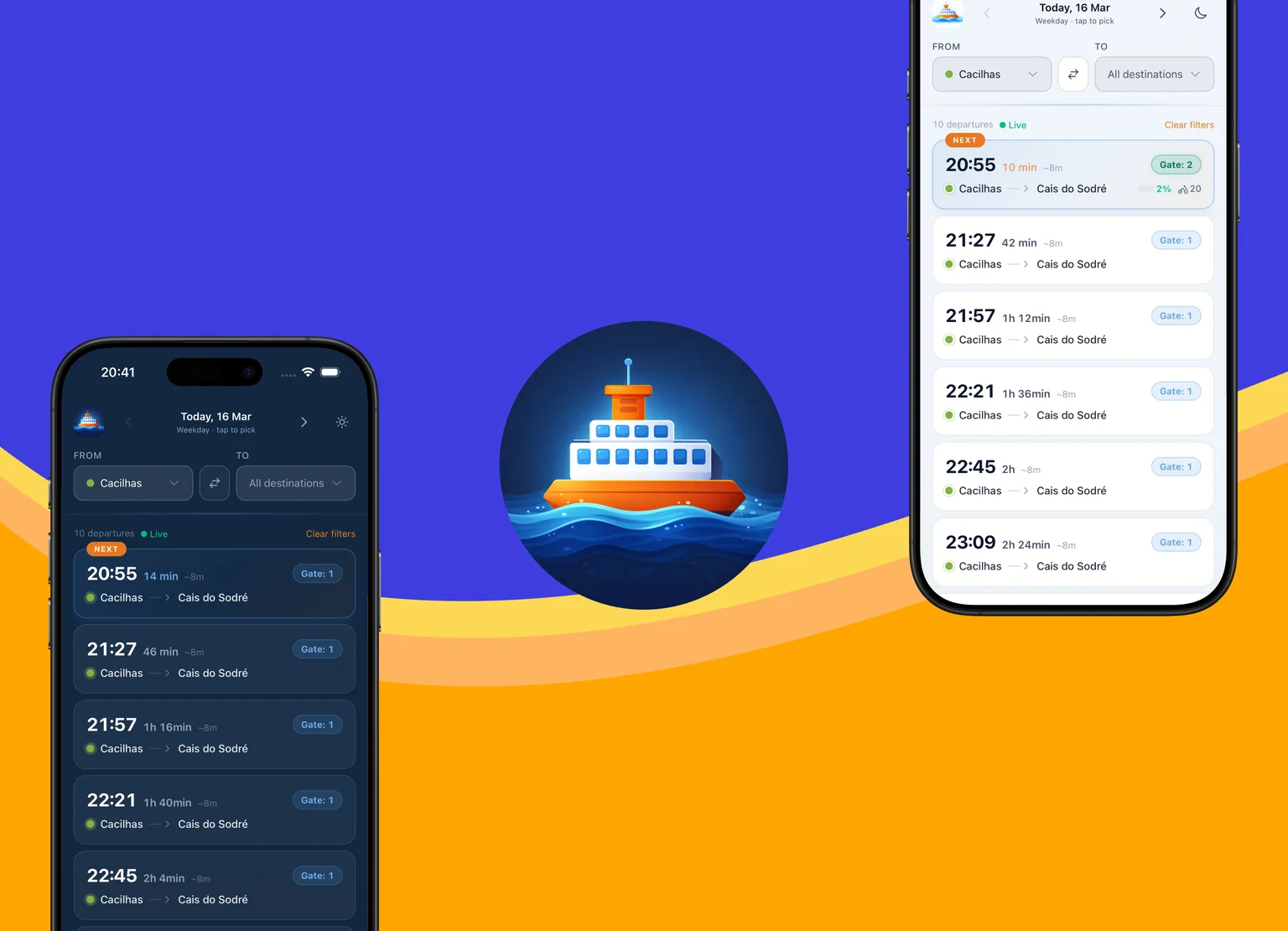
In a month of calendar time and three days of actual work I rolled out TTSL Ferries to Google Play and the App Store — a ferry schedule app for Lisbon with live departures, seven languages, a dark theme, and native builds for Android and iOS. All the code was written by Claude Code: I didn't open an IDE once, I only described what I wanted, checked the result, and gave feedback.
Why build your own when there's an official one
Transtejo has its own app. Absolute trash. Specifically:
- The schedule and live departures live on different screens. To check the next evening ferry, you switch to live; to look up Saturday's timetable, you go somewhere else. Constant ping-pong between tabs.
- The live-departures filter is awful. If you're at Cais do Sodré and your ferry goes to, say, Montijo — it gets pushed out of the "next departures" list by Cacilhas ferries that run every 15 minutes. Your ferry just isn't visible until it's literally next in line.
- To check the evening schedule in the morning, you have to dig into a separate section with a departures chart that is, to put it mildly, hideous.
- The Terreiro do Paço — Barreiro route has two different durations depending on which pier is used. The official app indicates this with asterisk footnotes — instead of, you know, just showing the duration. Why?
- The Belém — Porto Brandão — Trafaria route exists in two variants with a different order of stops. Again asterisks and footnotes, and it's on the passenger to figure out where they're actually going. In my app, the stop order is shown correctly for each specific departure.
- Tons of irrelevant stuff. Weather forecast. In the app. For ferry schedules. Why? Who asked for this?
- Portuguese only. A huge number of people living in Portugal don't speak Portuguese — expats, tourists, recent residents. The official app is unusable for them: the interface is Portuguese-only, no alternatives.
- The reviews reflect all this. People give it 2–3 stars and complain about exactly the same things.
The logic is simple: if the official tool doesn't do what you need, build your own. That used to mean months of work — writing everything by hand, wrestling with the stack, hunting down bugs. Today, in the age of vibe coding, it's genuinely faster to build it yourself than to find the perfect ready-made solution. My wife and I use the ferry regularly, and clicking through the official app every time just to check Saturday's timetable or see how long until the next ferry got old fast. So I sat down and built it. And hey, maybe someone else will find it useful too.
Where to start: know what you're building
I've done plenty of UI and UX work across different projects — client work and my own. So I immediately saw what the screen should look like: the next departure, how many minutes until it, how full the ferry is. The app should literally have one screen. That's it. No tabs, no weather, no navigation.
That said, vibe coding also works great in the opposite direction — when the idea isn't fully formed yet. You can quickly throw together several UI variants, see which one feels better, and hand it to other people to poke at. Vibe coding is a cheap hypothesis-checking tool.
The stack: Next.js + Capacitor + Django
This is a standard modern stack for this class of task. Nothing unusual.
- Capacitor — I had positive experience with it from previous work projects. Hybrid development with a single codebase for Android and iOS, no duplication. The app here is basic, Capacitor fits it perfectly.
- Next.js + Tailwind — a convenient frontend that plays very well with vibe coding. You debug everything you can in the browser first, then build native Android and iOS. Saves a lot of time.
- Django REST on the backend. A lot of people reach for FastAPI, but I like Django because Django Admin comes out of the box, as do things like email templates (not needed on this project, but often useful elsewhere). For this class of app Django doesn't materially affect performance, and a familiar stack saves time: easier deploys, no zoo of different technologies, and the same skills and Claude Code prompts get reused across projects.
What Claude Code did for me
A pleasant discovery of vibe coding is how much tedious work you can just skip.
- Project scaffolding.
create-next-app,cap init, Gradle files,Info.plist— just "set me up a skeleton for Android and iOS," and a minute later it's all there. - Icons and splash screens. I dropped in a single 1024×1024 image and said "slice it for all resolutions and update the right folders."
- Store listing. Descriptions for Google Play in seven languages, featured graphics, screenshots at the right sizes — all done the same way.
- Privacy policy. Claude generated the text for the exact set of data the app collects, and laid it out as a dedicated page.
- Django admin. A single "set up an admin for the route and schedule models" request — and I can edit data through a web interface.
- API reverse engineering. Transtejo has no public API — everything runs through their own app. Claude helped pull out the endpoints: look at the network traffic, decode the parameters, build my own integration on top.
- Fastlane. Claude generated everything Fastlane needs — configs, metadata, localized descriptions. I never actually wired up the automation itself: I don't ship updates often, so it's simpler to grab the prepared content from the Fastlane assets by hand and upload it through the Google Play and App Store web interfaces. But the option is there if I want it.
I honestly can't remember the last time I ran adb shell myself or edited AndroidManifest.xml — Claude handles all of that low-level fiddling for me.
How long this actually took
I track my activity 24/7 — using my own app, built the same way. So I can look at the exact numbers instead of "uh, about a month."
- 22.5 hours on the project total. This includes literally everything: development, asset generation, running through Google Play Internal Testing, finding testers for the closed test, preparing localized content in seven languages, troubleshooting builds, UI experiments.
- 6–8 hours of pure vibe coding. The actual development work: UI, icons, privacy policy, Django admin, business logic.
The other 14–16 hours are the surrounding chores: stores, screenshots, Google Play, App Store, reviews, builds, signatures, keys. Vibe coding helps here too — translations, screenshots, store content, all done the same way — just not as dramatically as with the code itself, though at this point even the chores would be painful without it.
About the calendar: the first commit was on March 13, and a working version existed a day or two later. Everything after that was waiting on stores and bureaucracy. Google Play's closed-testing procedure is currently a two-week wait. For iOS I waited a full month for the EU agreement to list the app in Europe — Apple is having a big review backlog because of the Digital Services Act. So don't read much into commit dates: the app came together fast, and the rest is waiting and paperwork.
What's next
The app is live, I use it, and I already have an itch to add more. On the roadmap:
- Prices embedded in routes. Right now the ticket price lives separately — it makes sense to attach it to each line.
- Transtejo announcements with auto-translation. They regularly reschedule ferries, cancel them due to weather, change piers — all of that lives in Portuguese on their news page. Pull it in and translate it automatically.
- A route map. A visual map of the lines: which terminal is where, and how the routes overlap.
Takeaways
- Vibe coding isn't magic, it's a shift of work. You stop writing code and start writing requirements, giving feedback, and testing. But productivity jumps noticeably: what used to take a month or two really does get done in three days of actual work.
- The stack is picked for habit and comfort. Next.js + Tailwind + Capacitor on the frontend, Django on the backend — a standard modern stack for this class of task. No need to reinvent the wheel.
- Test honestly and follow the full process. Whether you wrote it by hand or vibe-coded it — the engineering process still matters: development, tests, code review, refactoring. Follow it and you'll get a real result.
The app is on Google Play and the App Store. If you live in Lisbon and take the ferry — download for Android / download for iOS.