An old laptop and a home-made task dispatcher

I have several live projects, and each one has its own Claude Code agent. They write code, run tests and build releases — often at the same time, knowing nothing about each other. For a while all of this lived on my work laptop, and it was cramped there: memory ran out, the laptop slowed down, and tests started failing at random. This is the story of how I moved all the heavy work to an old laptop and built a simple task dispatcher for it — and why that turned out to matter more than just having a second machine.
The problem
I have more projects than this, but five main ones: TimeTracker, Repeat Cards, Qendaro, a Lisbon ferry timetable app and Poetory. And that's not counting my day job, which I also do on the same laptop. Each project has its own test suite — unit, API, end-to-end in a browser. Three of them also have mobile apps, and TimeTracker has desktop versions for Windows, macOS and Linux on top of that.
With Claude Code I almost always run several projects in parallel, and the agents often started their test runs at the same time. Some tests failed, others became flaky: five failed today, three different ones tomorrow. And the laptop itself slowed down, because its memory was simply taken up by everything at once — spinning up an Android emulator, building the Windows desktop version, running the browser tests of yet another project. Worst of all, from the outside you couldn't tell what was going on: either something had really broken, or the test was just being flaky.
At some point I decided: better that things wait longer, as long as the result is reliable.
Step one: just move it
When my wife wanted a MacBook and we bought her one, her old Xiaomi RedmiBook 14 was left sitting idle. Not the oldest machine, but nothing fancy either. I decided to turn it into a little server: installed Fedora and started running some things there by hand — just to take load off my work laptop.
Unexpectedly, the tests also ran faster there. On Windows, tests run in Docker Desktop, which pushes every file through the WSL2 virtual machine. On Fedora, containers run natively, through podman. The Repeat Cards stack comes up in 30 seconds instead of three minutes, and the API tests in one of the projects got three and a half times faster.
Step two: move everything that can be moved
The next thought was obvious: if something can be done on another machine, it should be done on another machine. And that's almost everything heavy:
- tests — unit, API and browser, for all five projects, each in its own isolated set of containers;
- the native part of the mobile apps — its tests run in emulators;
- Android release builds and uploading them to Google Play;
- desktop builds for Linux and Windows — Linux packages can only be built on Linux anyway;
- builds and native tests for iPhone and Mac — and those need macOS. It lives on the same laptop in a virtual machine and eats almost all of its memory. A VM like this has its limitations, but it's good enough for builds and tests.
And that's when it became clear that simply moving things over solves nothing. All these tasks arrive in random order, from different agents, at any time. If you just drag them over to another laptop, they'll get in each other's way exactly the same — only on a different machine. The macOS VM plus a browser test run next to it produce exactly the same flaky failures: when memory runs out, the system starts killing containers in the middle of a test.
My own dispatcher instead of CI
The proper answer to "tasks get in each other's way" is well known — a CI server with a queue: Jenkins, GitLab CI and the like. But setting up and maintaining such a system when you work alone seemed like overkill to me. I needed much less: heavy tasks running strictly one at a time, and the rest waiting their turn.
So together with Claude Code I built a simple stand-in for a CI engine — a command-line task dispatcher that solves specific problems on a specific machine. The first working version took between half an hour and an hour. It could queue a task, run tests, report status and keep statistics on how long each run usually takes. Those statistics immediately gave a forecast — for every task the dispatcher says when it will start and when it will finish. An agent no longer has to guess how long to wait.
Then came a few more iterations:
- a web page with the queue status;
- priorities — low, normal, high and urgent, which interrupts the current task. Only I can set urgent, not the agents;
- managing the macOS VM. If a task needs an iOS build, the dispatcher starts macOS, builds in it and shuts it down so that the following tasks get all the memory. A VM that I started myself, it leaves alone;
- Android, Linux and Windows builds as separate kinds of tasks;
- checking the store before the build. Once Google Play refused a release that had already been built because the version number was taken, and the App Store refused ten minutes into a build. Now the dispatcher spends ten seconds asking the store whether it will accept that version — before spending half an hour;
- cleanup after every task — after the disk once turned out to be clogged with three hundred gigabytes of old container images;
- and the usual string of assorted bug fixes.
The dispatcher is still built simply: a bash script, each task's state in plain files, a systemd user service. On the work laptop there's a small wrapper that passes commands over SSH. The agents' instructions have one rule: everything heavy goes only through the queue.
How the code gets there
I had long had Syncthing set up to sync working folders between my laptop and other devices. Without much thought, I used it for the repositories too: change a file on the work laptop and ten seconds later it's on the server, nothing to commit or push. Before a run, the dispatcher waits for the sync to finish so it doesn't test stale code.
It was quick to set up, but the limitations are obvious right away. You can only run tests on whatever is in the working folder right now — not on another branch or a tag. So right now I'm moving everything to a proper git-based setup: a task names a branch or tag, and the server fetches the right code from its own repository.
The web page
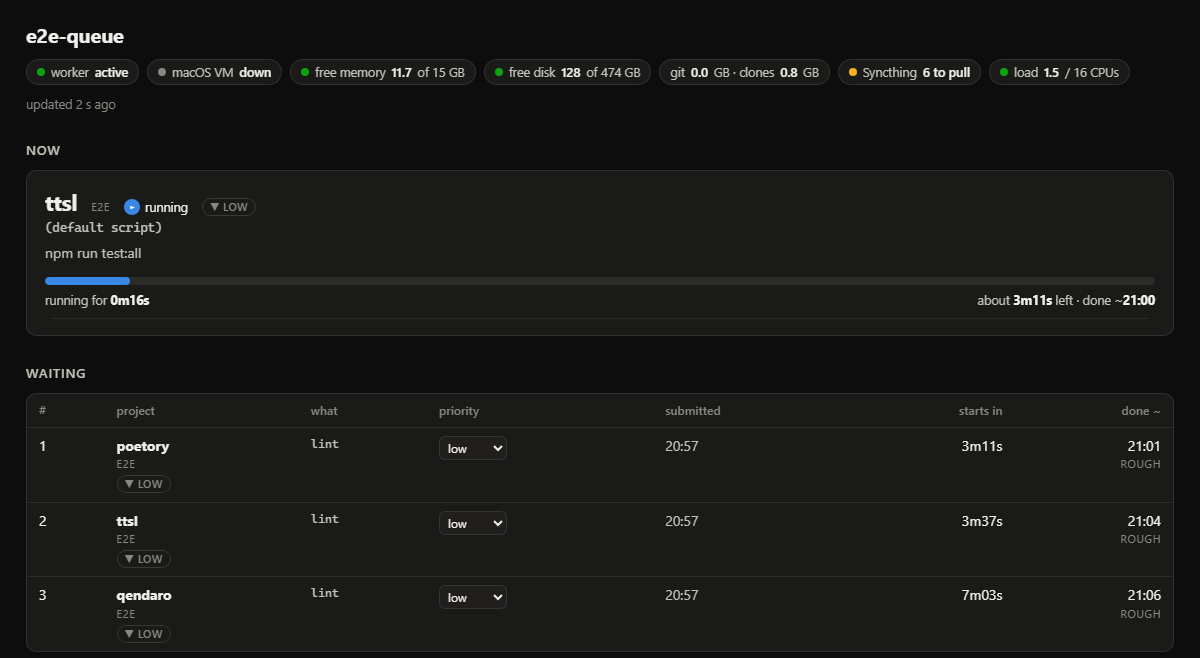
The page shows everything happening on the server: which task is running and which step it's on, how much time it has left, a live tail of the log, what's waiting in the queue and when it will start, the latest finished tasks, and run-time charts for each project. There's only one thing you can change on it — the priority of a task that's still waiting.
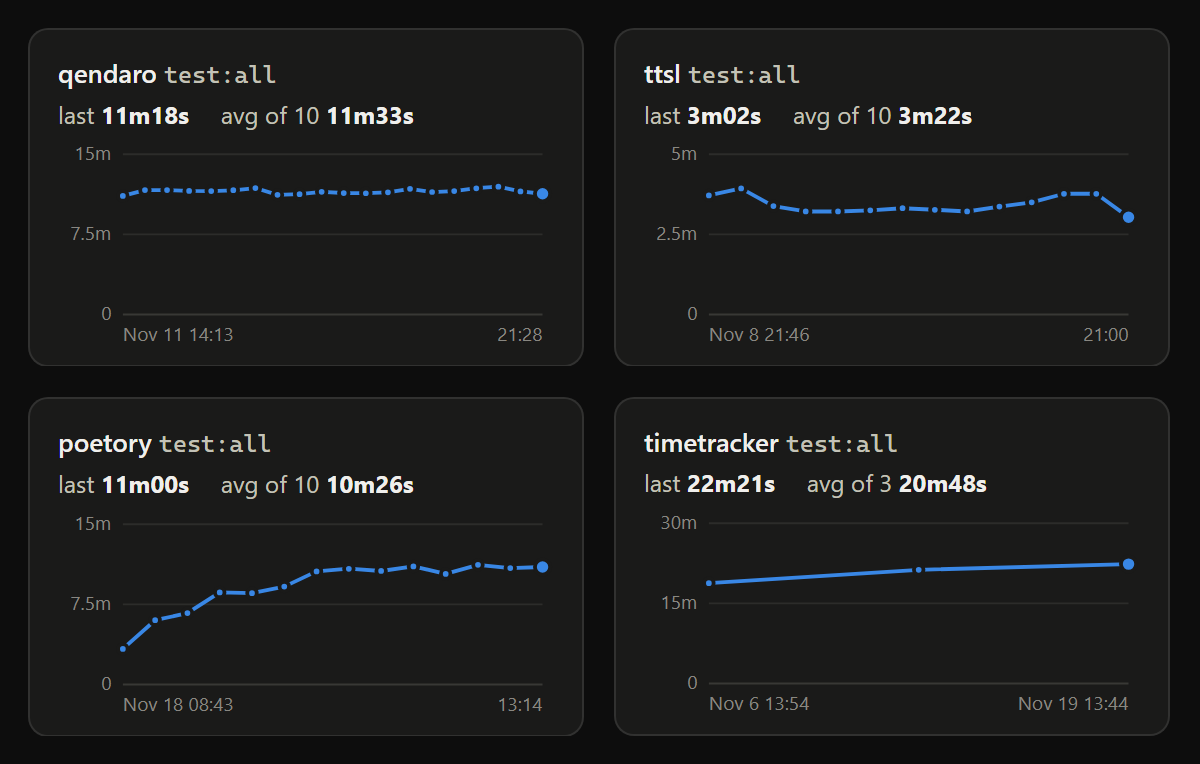
And this is what the charts of full-run times look like — each point is one run. These are what the dispatcher builds its forecast from. Poetory's chart creeps upward: in those days I was writing more tests, and the run grew along with them.
Two to three times faster
Once tasks stopped getting in each other's way, it became possible to squeeze the most out of the machine. I set up sharding: the test suites of the larger projects are split across several independent copies of the stack, and they run in parallel.
| Project | Before | After |
|---|---|---|
| Repeat Cards | 80 minutes | 25 minutes |
| TimeTracker | 43 minutes | 19 minutes |
| Qendaro | 24 minutes | 7 minutes |
That's a full run of all of a project's tests. Two to three times faster — on the same laptop.
When I'm away
I travel often and keep working on the road, so I need the test bench there too. Carrying two laptops around makes no sense: I take my main one, and the server stays at home. That means two things are needed: access to it from anywhere in the world, and confidence that it will come back up by itself after any failure — because there will be nobody to walk over and press the button.
Access. Not a single port is open from home to the outside. Instead, the server itself keeps a reverse SSH tunnel to my VPS on the internet, and I connect to it through that VPS — over SSH or remote desktop. The fallback is WireGuard. The queue and its web page work through the same tunnel, so from a café in another country everything looks exactly the same as at home.
Internet. If the network goes down at home, the tunnel drops, but it reconnects by itself as soon as the network is back. And the queue page on my laptop simply comes back to life on its own.
Power. This is where a laptop as a server turned out to be handy: it has a battery. While there's charge, it simply runs on it. When the charge drops to half, it shuts itself down cleanly, and then, on a timer, it switches on every now and then to check whether power is back: first once an hour, then less often. This scheme is needed because it won't switch itself back on after a power cut: its BIOS simply has no such setting. I haven't tested this part for real yet, but on paper it should work.
The bottom line
Work has become more pleasant: the work laptop no longer slows down and simply works. Work has become faster: full runs are two to three times faster than before.
There's a flip side. An individual task can now wait longer — for example, a build sits in the queue behind two or three test runs. But if I need it right now, I raise its priority, and it goes next.
And most importantly, I got a reliable tool. If a test failed, it really failed, rather than getting caught under someone else's build. The result became predictable, and that turned out to be worth more than any speed.